
Audio device
Open Edit -> Preferences… and select Audio device.
Configures timeline playback audio and related preview lock. Timecode I/O is on Timecode.
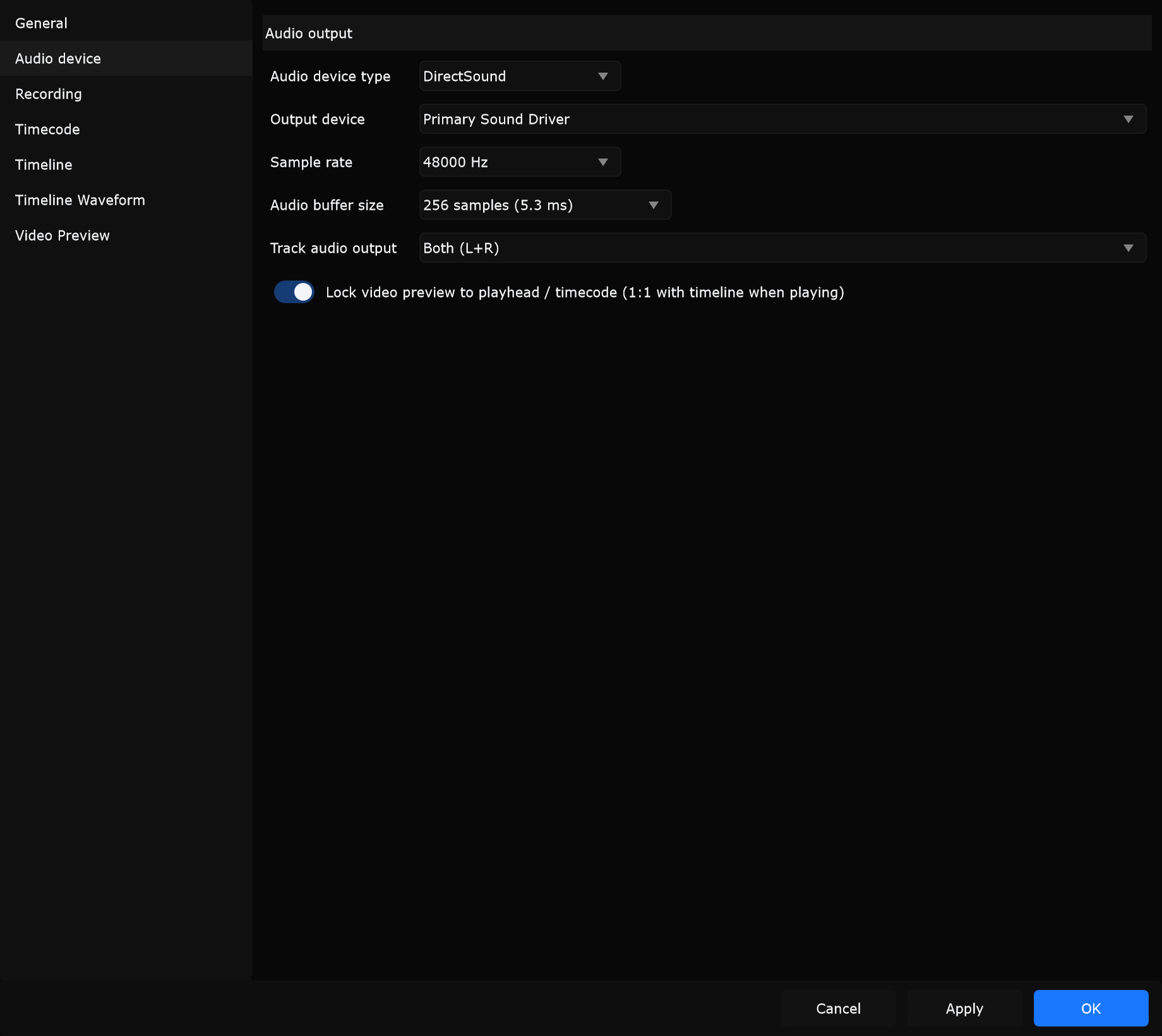
Audio output
Section titled “Audio output”Audio device type (Windows)
Section titled “Audio device type (Windows)”Chooses the driver family. Samba lists ASIO first, then DirectSound. macOS hides this row and uses Core Audio devices directly.
| Type | Role |
|---|---|
| ASIO | Lowest latency and multi-channel pairs on pro interfaces |
| DirectSound | Built-in fallback / simple stereo monitoring |
If a saved type or device is missing, the combo can show an unavailable / not found row. Reconnect hardware or pick another type.
When to use: Choose ASIO for show playback into a Dante/USB interface. Use DirectSound on a laptop with only built-in speakers when no ASIO driver is installed.
Output device
Section titled “Output device”Selects the physical or virtual output Samba opens (interface, headphones, virtual cable). Sample rate and buffer lists refresh for that device.
When to use: Point Samba at the FOH interface outputs during tech, or at headphones for hotel-room programming.
Sample rate
Section titled “Sample rate”Engine sample rate in Hz as offered by the current device (for example 44100, 48000, 96000). Changing rate reopens the device and can briefly interrupt audio.
When to use: Match 48000 when show stems and LTC gear are all 48 kHz so you avoid sample-rate conversion elsewhere.
Audio buffer size
Section titled “Audio buffer size”Device buffer in samples; the menu often also shows approximate latency in ms.
| Choice | Trade-off |
|---|---|
| Low buffer | Less monitoring latency; needs CPU headroom and a stable ASIO driver |
| High buffer | Safer on busy machines or DirectSound; more latency |
When to use: Use a low ASIO buffer when labelling hits while monitoring through Samba. Raise the buffer on an underpowered playback PC that only feeds PA and must not glitch.
Track audio output
Section titled “Track audio output”Which output channel(s) carry the timeline track mix.
| Typical options | Meaning |
|---|---|
| None | No track audio on this interface |
| Both (L+R) | Stereo sum to left and right |
| Left only / Right only | One side only |
| ASIO Channel 1, Channel 2, 1 & 2, … | Numbered channels and stereo pairs on multi-channel devices |
When to use: Send program to 1 & 2 and keep LTC on another channel (see Timecode). Use None when Samba only drives cues/timecode and audio comes from another player.
Lock video preview to playhead / timecode (1:1 with timeline when playing)
Section titled “Lock video preview to playhead / timecode (1:1 with timeline when playing)”When enabled, video preview stays locked to the timeline playhead (and followed timecode) while playing.
When to use: Keep on for programming and rehearsal so picture and cues stay aligned. Turn off temporarily only when troubleshooting a stuck or decoupled preview.
Applying changes
Section titled “Applying changes”Press Apply or OK after changing device, rate, buffer, or routing. If open fails, check cabling, exclusive mode in other apps, and the ASIO control panel.