
Connections - Pixera
Open Edit -> Connections… and select Pixera.
This page is the global PIXERA connection. File CSV import/export stays under Import and export. Continuous per-track push is under Track settings - PIXERA.
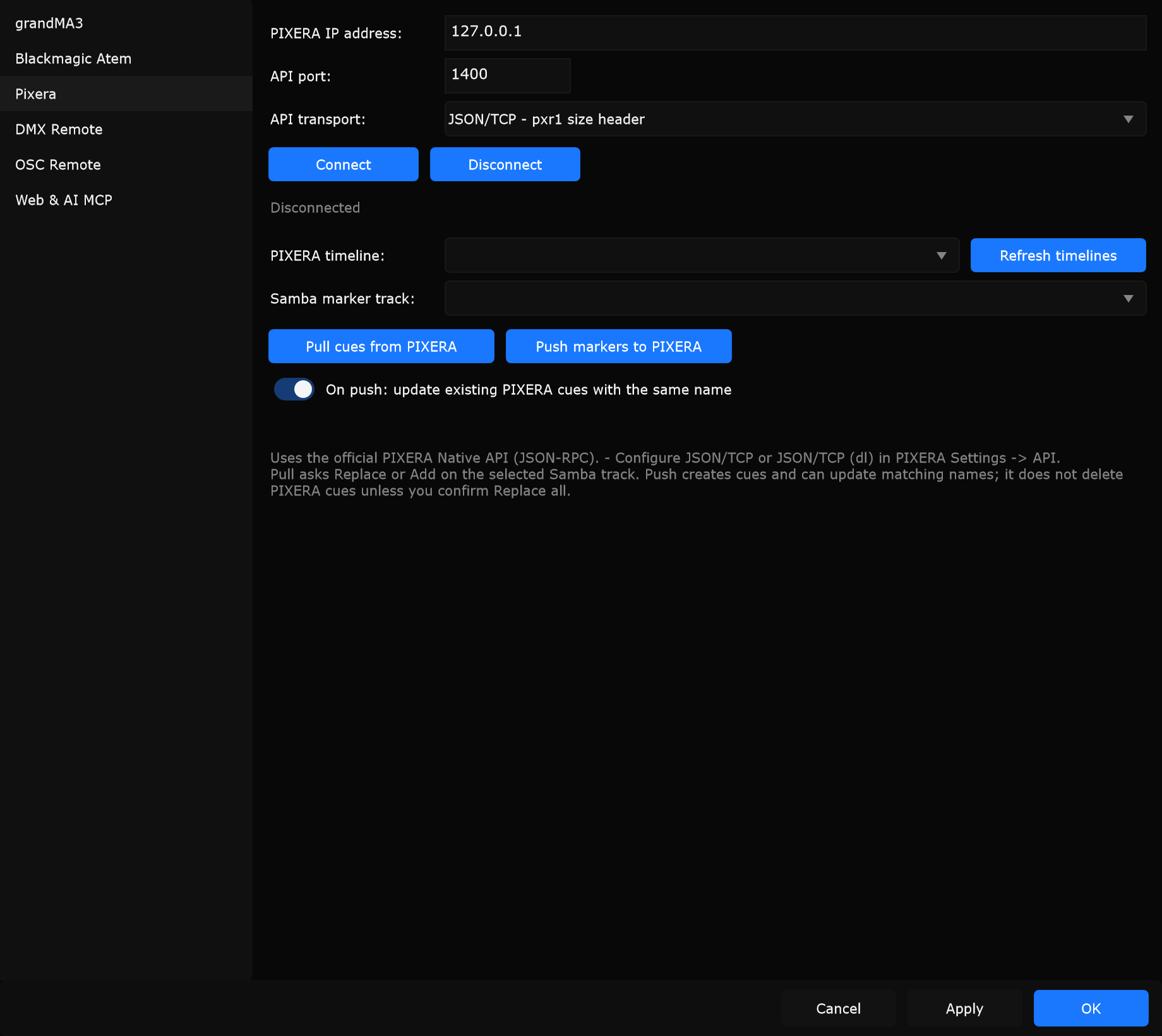
Controls
Section titled “Controls”PIXERA IP address
Section titled “PIXERA IP address”IP of the PIXERA system.
When to use: Same machine: often 127.0.0.1. Network: PIXERA host LAN IP from PIXERA Settings -> API.
API port
Section titled “API port”TCP port for the Native API (example default often 1400).
When to use: Match the port enabled in PIXERA Settings -> API. Restart PIXERA after changing API settings.
API transport
Section titled “API transport”Must match PIXERA:
| Option | Meaning |
|---|---|
| JSON/TCP (dl) - append 0xPX | Delimiter framing (append 0xPX) |
| JSON/TCP - pxr1 size header | Size-header framing (pxr1) |
When to use: Pick the same mode as PIXERA Settings -> API. Wrong transport fails Connect even with a correct IP.
Connect / Disconnect
Section titled “Connect / Disconnect”Connect opens the API session and loads timelines. Disconnect closes it.
When to use: Connect before pull/push or before enabling per-track Live Link. Disconnect when switching hosts or shutting down PIXERA.
PIXERA timeline
Section titled “PIXERA timeline”Timeline discovered from the API (often shown with fps).
When to use: Choose the timeline that should receive or provide cues for the selected Samba track.
Refresh timelines
Section titled “Refresh timelines”Reloads the timeline list from PIXERA.
When to use: After creating or renaming timelines in PIXERA while Samba stays connected.
Samba marker track
Section titled “Samba marker track”Which Samba track receives pulled cues or supplies markers to push.
When to use: Select the track that should mirror the chosen PIXERA timeline.
Pull cues from PIXERA
Section titled “Pull cues from PIXERA”Reads cues from the selected PIXERA timeline into the selected Samba track (Replace or Add).
When to use: When PIXERA already has the cue list and you want Samba to match.
Push markers to PIXERA
Section titled “Push markers to PIXERA”Creates cues on PIXERA from Samba markers. Can update matching names; does not delete PIXERA cues unless you confirm a replace-all style action when offered.
When to use: When Samba is the editor and PIXERA should receive the current marker list.
On push: update existing PIXERA cues with the same name
Section titled “On push: update existing PIXERA cues with the same name”When enabled, push updates PIXERA cues that share a name instead of always creating duplicates.
When to use: Leave on for iterative push of the same show. Turn off if every push must create new cues only.
Hint (on page)
Section titled “Hint (on page)”Uses the official PIXERA Native API (JSON-RPC). Configure JSON/TCP or JSON/TCP (dl) in PIXERA Settings -> API. Pull asks Replace or Add on the selected Samba track. Push creates cues and can update matching names.
Track-level Live Link
Section titled “Track-level Live Link”- Connect here first.
- Open Track Settings -> PIXERA for that track.
- Enable Live Link and choose a PIXERA timeline.
See PIXERA Live Link.