
Timecode
Open Edit -> Preferences… and select Timecode.
Split into Input (Samba follows an external clock) and Output (Samba generates timecode for other systems).
On-page hint: Timecode (LTC + Art-Net) is sent when the transport is playing. Changes apply immediately.
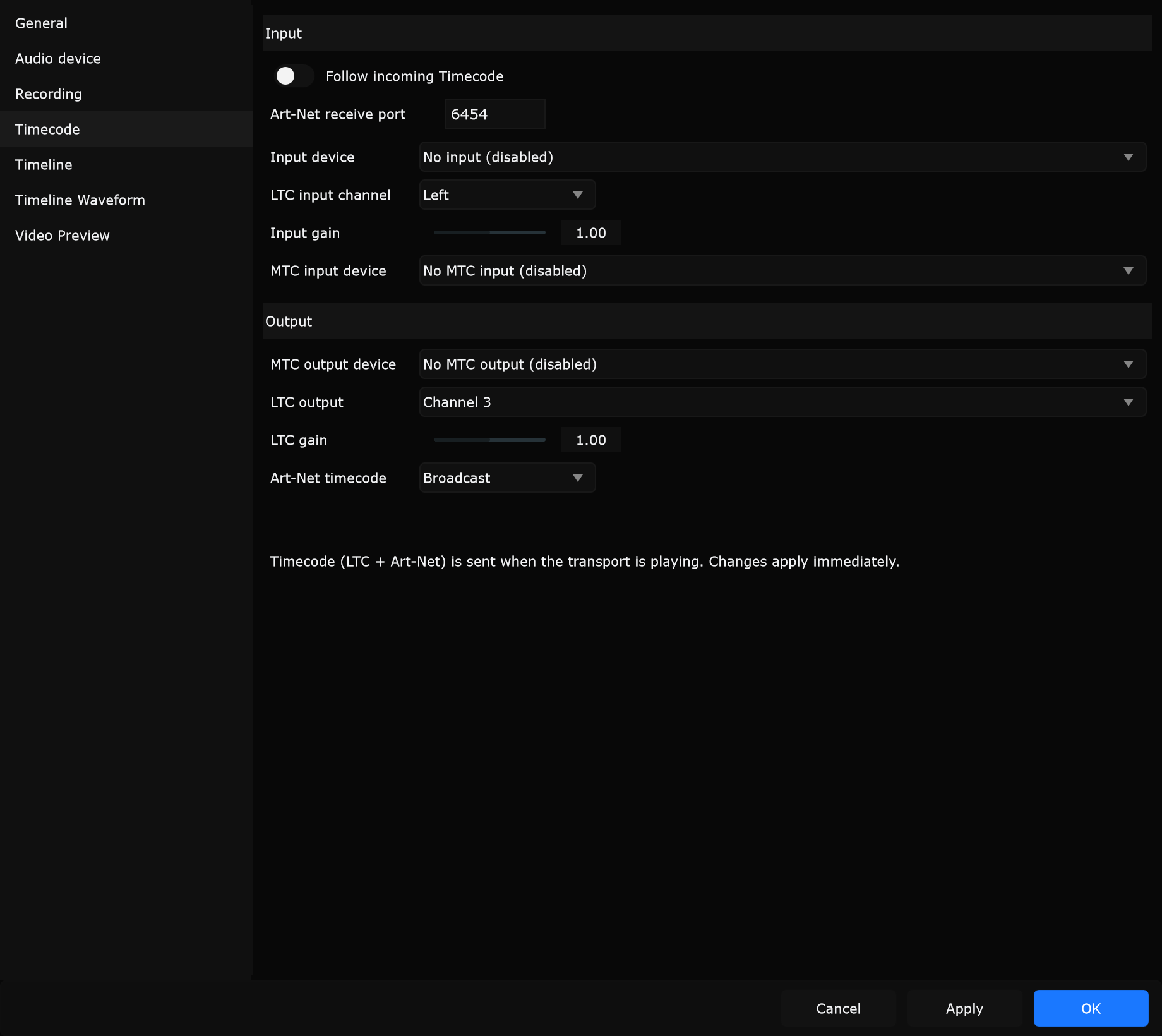
Follow incoming Timecode
Section titled “Follow incoming Timecode”When enabled, the timeline follows valid incoming timecode (Art-Net, LTC, and/or MTC, depending on what you configure below).
When to use: Slave Samba to a lighting console or sync box that owns the show clock. Leave off for free-running Samba transport.
Art-Net receive port
Section titled “Art-Net receive port”UDP port Samba listens on for Art-Net timecode.
When to use: Match the port your media server or console transmits to (wrong port means Follow never sees packets).
Input device
Section titled “Input device”Audio input used to decode Linear Timecode. Choose No input (disabled) when not using LTC in.
When to use: Select the interface channel fed from the console’s LTC out when Samba must follow the desk.
LTC input channel
Section titled “LTC input channel”Which channel on the input device carries LTC (Left, Right, or higher channels when available).
When to use: Route LTC to a dedicated channel (often Right or Channel 3) so program music does not hit the decoder.
Input gain
Section titled “Input gain”Level trim for the LTC decoder.
When to use: Raise or lower until decode is solid if frames jump or drop; keep program audio off this channel.
MTC input device
Section titled “MTC input device”MIDI device that receives MIDI Timecode. No MTC input (disabled) turns MTC in off.
When to use: Follow a DAW or MIDI interface that masters the session with MTC instead of LTC.
Output
Section titled “Output”Outgoing LTC and Art-Net run while transport is playing (see the on-page hint). Pause or stop when you need timecode to stop with the show.
MTC output device
Section titled “MTC output device”MIDI device that transmits MIDI Timecode. No MTC output (disabled) turns MTC out off.
When to use: Drive a DAW or lighting desk that expects MTC from Samba while you play the timeline.
LTC output
Section titled “LTC output”Which audio output channel(s) carry Linear Timecode: Disabled, Left, Right, Both, or extra channels on multi-channel / ASIO devices.
When to use: Put LTC on a free channel while track audio uses another pair (set on Audio device) so music never overwrites the tone.
LTC gain
Section titled “LTC gain”Level of the generated LTC tone. Tooltip: adjust if timecode jitters or drops because the level is too high or too low.
When to use: Trim until the console or hardware reader locks cleanly without clipping.
Art-Net timecode
Section titled “Art-Net timecode”| Mode | Behaviour |
|---|---|
| No Output | Do not send Art-Net timecode |
| Broadcast | Send to the broadcast address |
| Network interface | Bind to a specific NIC (interface combo lists IP and broadcast target) |
When to use: Broadcast for a simple single-subnet media LAN. Network interface when the machine has multiple NICs and only the show network should get timecode.
Practical setups
Section titled “Practical setups”Follow console LTC
Section titled “Follow console LTC”- Enable Follow incoming Timecode
- Set Input device and LTC input channel
- Trim Input gain until decode is stable
Generate Art-Net for media servers
Section titled “Generate Art-Net for media servers”- Leave Follow off unless you intentionally re-clock
- Set Art-Net timecode to Broadcast or a show NIC
- Play the timeline - Art-Net goes out while transport plays
MTC to a DAW
Section titled “MTC to a DAW”- Select the MIDI interface under MTC output device
- Play the timeline so the DAW can chase Samba