
Connections - DMX Remote
Open Edit -> Connections… and select DMX Remote.
Control Samba transport, volume, track, and cue jumps from Art-Net or sACN (E1.31).
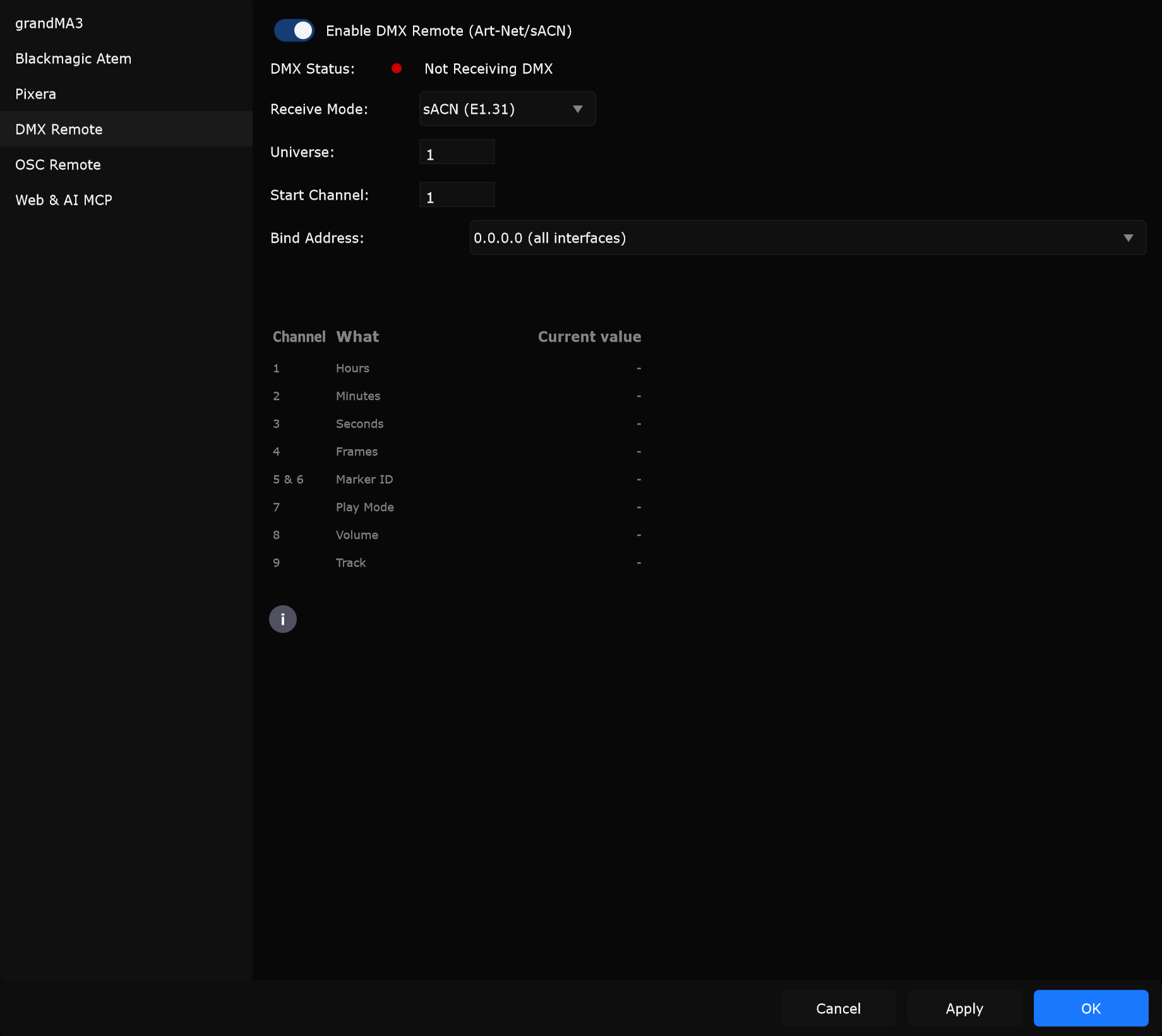
Controls
Section titled “Controls”Enable DMX Remote (Art-Net/sACN)
Section titled “Enable DMX Remote (Art-Net/sACN)”Starts or stops the DMX listener.
When to use: Enable when a lighting console or node should drive Samba. Leave off when you only use keyboard, OSC, or web remote.
DMX Status
Section titled “DMX Status”| Status | Meaning |
|---|---|
| Not Receiving DMX | Enabled but no matching universe data yet |
| Receiving DMX | Packets arriving |
| Receiving DMX from: source | Packets arriving; source name known |
When to use: Confirm universe, start channel, and bind address after Apply.
Receive Mode
Section titled “Receive Mode”| Option | Protocol |
|---|---|
| Art-Net | Art-Net DMX |
| sACN (E1.31) | Streaming ACN |
When to use: Match the protocol your console or node transmits.
Universe
Section titled “Universe”Universe number to listen on.
When to use: Match the universe your desk sends for Samba remote.
Start Channel
Section titled “Start Channel”First of nine consecutive DMX channels.
When to use: Set to the start address patched for Samba on the desk.
Bind Address
Section titled “Bind Address”| Option | Meaning |
|---|---|
| 0.0.0.0 (all interfaces) | Listen on every NIC |
| Local (127.0.0.1) | Localhost only |
| Network: IP | Bind to one listed interface |
| Specific IP address… | Enter a custom bind IP |
When to use: Prefer a specific NIC on multi-homed show PCs. Use all interfaces for simple single-LAN setups.
Specific IP address
Section titled “Specific IP address”Shown when bind mode is Specific IP address….
When to use: Type the exact interface IP Samba should bind.
Channel table
Section titled “Channel table”Live view of the nine channels from the start address:
| Channel | What |
|---|---|
| 1 | Hours |
| 2 | Minutes |
| 3 | Seconds |
| 4 | Frames |
| 5 & 6 | Marker ID (16-bit) |
| 7 | Play Mode |
| 8 | Volume |
| 9 | Track |
Use the info button on the page for the full help text.
Play Mode (channel 7)
Section titled “Play Mode (channel 7)”From the on-page help, by DMX value range:
| Range | Action |
|---|---|
| 0-9 | Init |
| 10-19 | Play |
| 20-29 | Pause |
| 30-39 | Jump to Start |
| 40-49 | Jump to End |
| 50-59 | Jump to Marker (Ch 5+6 = cue ID; playback continues if already playing) |
| 60-69 | Jump to Time (Ch 1-4; playback continues if already playing) |
| 70-79 | Stop |
| 80-89 | Jump to Next Marker |
| 90-99 | Jump to Previous Marker |
| 100-255 | No action |
Tip: Pulse Init (0-9) before Play if Play does not start from your console.
Channel 9 Track: 0 = no action, 1 = track 1, 2 = track 2, and so on.
When to use: Map a desk executor or playback fader to these ranges for show control without OSC.
Typical setup
Section titled “Typical setup”- Enable Enable DMX Remote (Art-Net/sACN).
- Choose Receive Mode.
- Set Universe and Start Channel.
- Set Bind Address.
- Apply and watch DMX Status until Receiving DMX.